Equinox 8500i display is not full screen
Summary:
Enter Summary here.
Cause:
Issue is due to incorrect software load
You can reload the correct software via USB drive
Solution:
Steps to resolve:
Download 'Equinox 8500 fix.zip' file attached below
This contains 3 folders:
-6200 App 1.23.0-4 uninstall
-8500 App 1.23.0-4 install
-IDP
Inside 6200 App 1.23.0-4 uninstall is a folder labeled USB, place this onto the root of your USB drive
PRESS & HOLD the magnifying glass key on the Luxe 8500i terminal until you hear a BEEP, then quickly press the magnifying glass key TWICE. The terminal displays the Desktop Manager.
Choose Setup then System Utils then USB Update and then Uninstall… Then repeat the process with the 8500 App 1.23.0-4 install USB folder and select Install from the USB Update menu
When installing the new software you may see an error
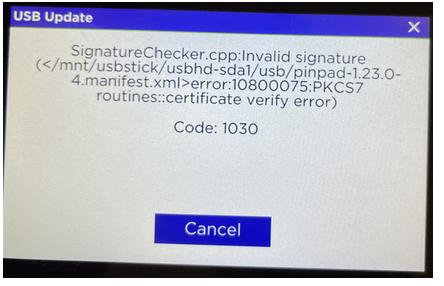
Device likely did not have IDP installed. You will need to flash IDP using the same steps as the 8500 software. Place the files from the IDP folder inside a USB folder on the root of your USB drive.
Once IDP is installed you can then install the 8500 software and test
After completing this process you can proceed with the standard 8500i install steps and test from counterpoint